
A WCAG accessibility audit is a structured test of your website against the Web Content Accessibility Guidelines (WCAG). Specialists combine automated scans, manual checks, and screen reader testing to find barriers that stop people with disabilities from using your site. You get a report listing each issue, the WCAG criterion it breaks, how serious it is, and how to fix it.
To get started, choose your target standard (WCAG 2.2 Level AA is the safest pick), agree which pages and user journeys to test, and book a WCAG accessibility audit with a team that tests by hand, not just by scan. Most audits take one to six weeks. Costs run from a few hundred dollars for a small site to well over $10,000 for a large platform.
| Key Takeaways |
|
What a WCAG Accessibility Audit Covers?
WCAG rests on four principles: perceivable, operable, understandable, and robust. It has three conformance levels. Level A covers basic barriers, AA is the usual legal and procurement target, and AAA is the strictest and rarely required in full. A WCAG accessibility audit tests your pages against the success criteria under each principle.
Auditors check whether visitors can use every page with only a keyboard, whether focus stays visible, and whether headings and links make sense to a screen reader. They test color contrast (at least 4.5 to 1 for regular text), alt text, form labels, error messages, video captions, dynamic content such as menus and pop ups, and how layouts behave on mobile and at 200% zoom.
A good audit blends three methods:
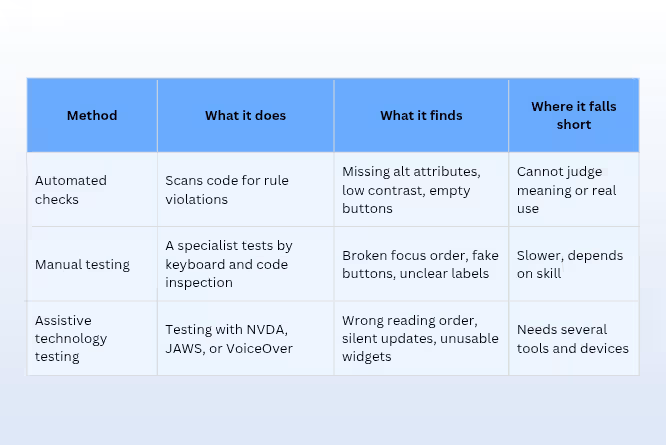
Scans alone are not enough. Accessible.org says automated tools flag only about 25% of issues, and The A11Y Collective puts the figure at 30 to 40%.
Who Needs a WCAG Accessibility Audit
Any public website can benefit, especially ecommerce, SaaS, public sector, healthcare, and B2B vendors facing procurement checklists. WebAIM’s 2026 analysis of one million home pages found WCAG 2 failures on 95.9% of them, up from 94.8% the year before. Those gaps quietly cost leads, one of the common digital marketing mistakes, and fixing them supports the wider benefits of WCAG compliance.
How a WCAG Accessibility Audit Works, Step by Step
The W3C publishes an evaluation method called WCAG-EM, and most professional audits follow its logic:
- Set the standard. Agree on the WCAG version and level, usually 2.2 AA.
- Define the scope. List key templates and journeys: home page, product pages, checkout, forms, login, and third party widgets. Auditors test a representative sample, not every URL. Say upfront whether mobile apps, PDFs, and documents are included, since they are often tested separately.
- Run automated scans for a baseline and quick wins.
- Test manually for keyboard use, focus order, headings, forms, zoom, and code.
- Test with assistive technology on desktop and mobile.
- Deliver the report your developers, designers, and editors can act on.
To prepare, gather your page list, login access, and third party tools. If you already run a digital marketing audit, reuse the same page inventory.
What Your WCAG Accessibility Audit Report Should Include?
Each finding should state the issue, where it appears, the WCAG success criterion it fails, its severity, who it affects, and how to fix it, with a screenshot and steps to reproduce. Be wary of pasted scan results.
What Happens After the Report
Fix issues that block checkout and forms first. Accessible.org notes that most clients finish remediation within one to four months. Your team can fix issues in house, or you can bring in accessible website development support. Either way, ask for a retest.
Do not treat an overlay widget as a shortcut. In 2025 the FTC finalized an order requiring accessiBe to pay $1 million over claims that its automated tool could make any website WCAG compliant.
Audit, User Testing, and Monitoring
An audit tests your site against WCAG at one point in time. User testing puts people with disabilities in front of key tasks and finds usability problems criteria miss. Monitoring runs scheduled scans, because accessibility drifts as pages change. Most teams audit first, then monitor.
Audit and VPAT or ACR
A VPAT is the template for an Accessibility Conformance Report (ACR), which buyers often request. An ACR needs audit evidence behind it, so audit first and document second.
Which Standard Should Your WCAG Accessibility Audit Use?
The ADA does not name a technical standard for private websites. Courts treat WCAG 2.1 Level AA as the de facto benchmark in Title III cases, according to Level Access. WCAG 2.2 became the W3C’s recommended version on October 5, 2023. It adds six criteria at Levels A and AA, covering focus visibility, target size, and accessible login. Meeting 2.2 AA also satisfies 2.1 AA, so auditing against 2.2 gives you the legal baseline plus a buffer.
| Rule | Who it covers | Standard | Status |
| ADA Title III | Private businesses open to the public | No DOJ rule; courts use WCAG 2.1 AA | Enforced through lawsuits |
| ADA Title II | State and local governments | WCAG 2.1 AA | April 26, 2027 (population 50,000 or more); April 26, 2028 (smaller entities) |
| Section 508 | US federal agencies and their vendors | WCAG 2.0 A and AA | In force |
| EAA and EN 301 549 | Products and services sold in the EU | EN 301 549, which references WCAG | Applies since June 2025 |
The Title II dates come from an April 2026 DOJ interim final rule. Confirm current dates with ADA.gov or your counsel.
WCAG Accessibility Audit vs ADA Compliance Audit
An ADA compliance audit asks whether your site meets your legal obligations. A WCAG accessibility audit supplies the technical evidence, because WCAG is the yardstick courts and settlements use. The two overlap heavily, though the legal version may add review of your business type and risk. No audit guarantees ADA compliance, and there is no official W3C certification for websites, so be skeptical of any badge.
The stakes are real. Seyfarth Shaw counted 3,117 federal website accessibility lawsuits in 2025, up 27% from 2,452 in 2024. Level Access reports website cases were 36% of all ADA Title III federal filings, and more than 5,000 once state courts are included.
How Long a WCAG Accessibility Audit Takes and What It Costs?
Timelines run from one to six weeks. Accessible.org quotes one to two weeks for a typical audit, The A11Y Collective’s standard is four weeks, and large sites take longer.
Accessibility audit pricing varies even more. Accessible.org lists typical audits at $1,250 to $2,750, and The A11Y Collective’s range works out to roughly $5,500 to $16,000 or more for large platforms (converted from €5,000 to €15,000). Cost follows templates and components more than raw page count, plus interactive features, your site’s current state, and testing depth. Retests, an ACR, mobile apps, PDFs, and remediation are usually extra.
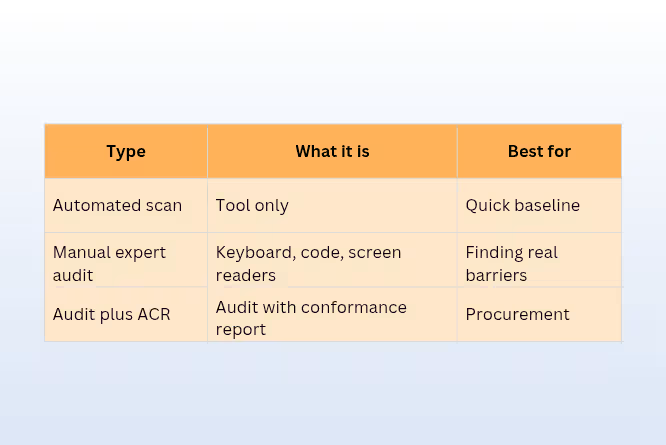
At BolsterBiz, the free basic review runs preliminary checks on selected pages. The advanced WCAG audit starts at $299 for up to 7 pages and includes an automated scan, manual testing, screen reader testing, and a detailed report. Remediation is priced separately, from $399 for up to 15 pages, and ecommerce or custom builds start at $799. Larger sites are quoted by scope. Our accessibility audit services target WCAG 2.2 Level AA.
How to Choose Accessibility Audit Companies
Not all accessibility audit companies work the same way. When you compare accessibility audit services, ask:
- Do they test manually with real screen readers, or mostly run scans?
- Can you see a sample report?
- Are retest, ACR, and remediation priced separately?
- Can they fix the issues, or will you need another team?
An accessibility audit without a path to remediation often sits in a folder. The decision looks a lot like SEO in house vs outsourcing: weigh skills, speed, and cost. If you are comparing broader partners, start with this list of top digital marketing agencies for startups.
Start Your WCAG Accessibility Audit
A WCAG accessibility audit gives you a clear list of what to fix, in what order, and why. Choose WCAG 2.2 AA, insist on manual and screen reader testing, and plan for a retest. Once your site works for everyone, send it traffic with the 10 best digital marketing strategies for startups.
Ready to see where you stand? Book a free WCAG review and we will walk you through the findings.
Frequently Asked Questions
What is a WCAG accessibility audit?
A WCAG accessibility audit tests your website against the Web Content Accessibility Guidelines using automated scans, manual testing, and screen readers. It produces a report listing each barrier, the criterion it fails, its severity, and a recommended fix.
How much does a WCAG accessibility audit cost?
Costs depend on templates and complexity. Typical audits run about $1,250 to $2,750, and large platforms can exceed $5,500. BolsterBiz’s advanced audit starts at $299 for up to 7 pages. Retests, ACRs, and remediation are usually extra.
How long does an accessibility audit take?
Most audits take one to six weeks. Small sites with few templates finish faster, while large platforms take longer. Remediation is separate, and many teams complete fixes within one to four months after receiving the report.
Is an ADA compliance audit the same as a WCAG accessibility audit?
Not exactly. A WCAG accessibility audit tests technical criteria, while an ADA compliance audit frames results around legal risk. Courts often use WCAG 2.1 AA as the benchmark, so the two overlap. Neither guarantees compliance without fixes.
What is the difference between an audit and a VPAT?
An audit tests your site and lists barriers to fix. A VPAT is a template for an Accessibility Conformance Report that documents conformance for buyers. A credible report needs audit evidence behind it, so most teams audit first.