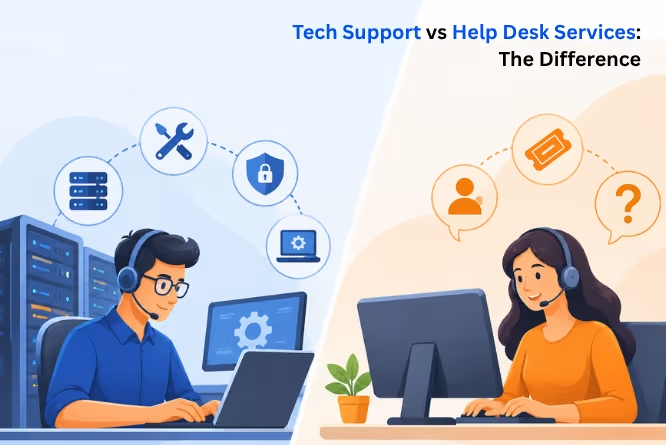
Tech support vs help desk services comes down to speed versus depth. A help desk is the first stop that fixes common problems fast, and tech support is the deeper team that handles the hard ones. The best way to handle holiday inquiries is to staff both, and outsourcing is the easiest way to do it.
Most teams do not fail in December because they lack skill. They fail because the same few people are on leave when tickets spike. This guide shows where each service fits and how to cover live inquiries without hiring a big seasonal team.
One quick note on who this is for. An internal help desk serves your own staff, and a customer-facing help desk serves the people who buy from you. The advice works for both, and each example below is tagged so you can spot your case.
| Key Takeaways |
|
Tech Support vs Help Desk Services: The Simple Difference
Let us keep the definitions simple. Both fall under IT support services, but they do different jobs.
IT helpdesk services are the front door. A person calls, chats, or emails, and an agent logs the issue and tries a quick fix.
Tech support sits behind that door. These are the people who read logs, rebuild systems, and fix what the first agent could not. In most business IT support plans, both live under one roof.
| Help desk | Tech support | |
| Main job | First reply and quick fixes | Deep fixes and root causes |
| Tier | Level 1 | Levels 2 and 3 |
| Typical request | Password reset, login, how-to | Server down, app crash, data errors |
| Skills | Broad, friendly, fast | Narrow, expert, patient |
| Goal | Reply in minutes | Fix it for good |
| Key metrics | First response time, first-contact resolution | Time to resolution, escalation rate |
| Who calls | Staff and users | Tickets passed up by the help desk |
That is the core of tech support vs help desk services: a fast first reply versus a deep fix. Some vendors sell the whole bundle as IT help desk support services, which blurs the line, so ask for the split in writing.
Two related terms come up a lot. A service desk is a wider version of a help desk that also handles requests and changes. Desktop support is hands-on help with a user’s computer, on site or remote.
Also read: What is IT staff augmentation, a complete guide to adding offshore IT talent to your team.
Why Holidays Affect Your Support Setup
Holidays do two things at once. Ticket volume goes up and staff goes down.
A 2025 study of more than 10 million customer-facing support interactions found that agents handle about 22% more sessions per week in peak season. You can read the numbers in Typewise’s Holiday Support Surge Report. The same study says many teams cut back live chat in peak weeks, which pushes urgent problems into slower email.
Internal IT feels it too. Fixify’s 2026 IT Help Desk Benchmark Report looked at more than 50,000 tickets and found that roughly one in five stops the user from working at all.
On the ground, it looks like this. Response times slip because the same agents cover more queues. Small technical issues, like a locked account, wait behind big outages.
Sites break too. A crashed checkout page needs a developer, not an agent. Many teams use front end development outsourcing for fast fixes while support keeps answering.

Real Holiday Scenarios and What can go Wrong
Customer-facing: Picture an online shoe store on Black Friday. Payments fail at 9 a.m. and the chat fills with “Did my order go through?” The one agent on shift cannot tell if it is a card issue or a site bug.
The help desk calms the queue with clear updates. Tech support finds the payment bug. You need both.
Internal IT: Now take a small accounting firm in Sydney in late December. One partner is locked out of the tax software, and the only IT person is on a flight. A two minute reset took two days.
Internal IT, regulated: Or a clinic in Texas reopening on December 26 after a system update. Half the front desk cannot log in, and nobody with admin access is on call.
Some of this is avoidable. Teams that test before big sales use QA outsourcing services to catch broken forms early. Fewer bugs means fewer tickets, and customer satisfaction stays higher.
How IT Outsourcing Helps You Handle Live Inquiries
Hiring seasonal staff for customer service sounds easy. It is not. You pay for recruiting, training, and tools, then let them go in January.
Outsourcing is faster. A good partner already has trained agents, a working queue, and cover for nights and weekends.
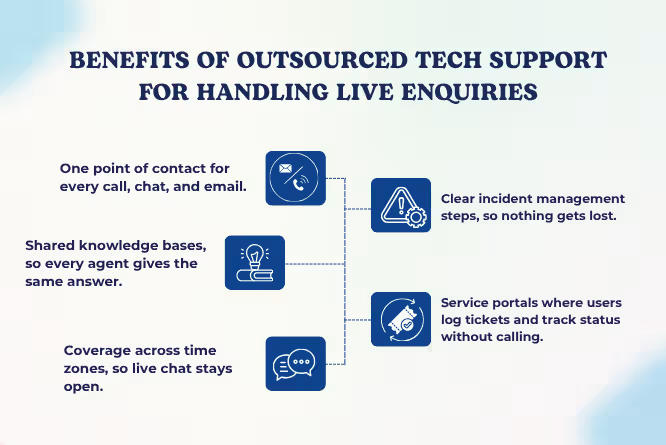
For both tech support vs help desk services, a good partner gives you:
- One point of contact for every call, chat, and email.
- Clear incident management steps, so nothing gets lost.
- Shared knowledge bases, so every agent gives the same answer.
- Service portals where users log tickets and track status without calling.
- Coverage across time zones, so live chat stays open.
Good partners also report on satisfaction scores, first reply time, and backlog each week. For a simple start, take a short trial at outsourcing IT help desk work for the busy weeks only.
Help Desk or Tech Support: Which One Do You Need?
Use a quick rule. If most requests are simple and repeat often, start with the help desk. If your product is complex or breaks in odd ways, add tech support.
A help desk focuses on speed and a friendly first reply. Tech support is about the root cause. When you weigh tech support vs help desk services, ask which pain hurts more today.
Here is how it usually plays out by company type:
- Non-tech business (retail, accounting, services): start with a help desk. Most problems are logins, email, and devices.
- SaaS or software company: add tech support early. Users hit product bugs, not just login issues.
- Regulated or clinic setups: you need both, plus an admin on call. A locked system can stop work and put records at risk.
Most growing firms need both. Keep your support structured in three layers: the help desk at level one, tech support at levels two and three, then outside vendors. You also need basic service management, with owners and deadlines for every ticket.
Write down the handoff rules too. Say who owns a ticket, and how fast it must move up.
Also read: How to hire technical support outsourcing in US, if your users are in the States.
What are the Best IT Outsourcing Companies
Full disclosure: BolsterBiz publishes this blog. Here are four common ways to get holiday cover, with who each one suits:
- BolsterBiz: remote agents for IT support, staff augmentation, and customer support outsourcing. You can start with one agent and scale as you grow, and teams in Australia and the US are both covered. Choose this if you want a low cost start with room to grow.
- A local managed services provider: strong on-site help, but often higher cost and fixed contracts. Choose this if you need people in your office.
- A large call center vendor: big scale, but less personal and often tied to high minimums. Choose this if you have very high volume and a big budget.
- Temp hires or freelancers: flexible, but you carry the training and the management. Choose this if you only need a few weeks of cover and can train people yourself.
When you compare providers on tech support vs help desk services, ask about training, tools, and who owns escalations. You can asses the top IT staff augmentation companies US to make an informed decision
IT Support Outsourcing with BolsterBiz
BolsterBiz IT staff augmentation works as an extension of your team and covers both sides of tech support vs help desk services. The agents fit around your tools, hours, and holiday dates.
The big win is how you start. Begin with just one agent, watch a few busy weeks, then add more. No full call center on day one.
It is also affordable. Remote agents start from about $8.50 an hour, and technical or specialist roles can can differ in pricing depending on the experience and scope of work. That keeps nights, weekends, and early January in budget.
Holiday volume will not wait, so settle your plan for tech support vs help desk services early. Run through this list a few weeks before the first big sale:
- Name an escalation owner for each tier.
- Build a holiday coverage calendar.
- Keep an admin on call, with access ready.
- Update your knowledge base for the top ticket types.
- Set a change freeze before peak.
- Write ready-made status messages for outages.
If you want to see how BolsterBiz IT support and staff augmentation could fit your team, you can schedule a free consultation today. Bring your ticket numbers and talk it through. No pressure.
FAQs on Tech Support vs Help Desk Services
What is the difference between a help desk and tech support?
A help desk takes the first contact, fixes simple problems, and passes the rest up. Tech support handles deep problems that need expert skills. Once you see tech support vs help desk services side by side, it is easier to staff each one.
Do I need both a help desk and tech support?
Most growing firms do. The help desk absorbs the volume and tech support handles the deep fixes. Start with a help desk and add tech support as problems get harder.
Is a help desk the same as IT support?
Not exactly. IT support is the big umbrella. A help desk is one part of it, usually the first line.
What is the difference between a help desk and a service desk?
A help desk fixes problems as they appear. A service desk takes a wider view and also handles requests, changes, and planning.
What is desktop support?
Desktop support is hands-on help with a user’s computer and apps, on site or remote. It usually sits between the help desk and deeper tech support.
How do you handle live inquiries during the holidays?
Plan volume early, keep live channels open, and add outsourced agents for peak weeks. Give every agent the same answers and a clear path to escalate.